Quick answer: set a limit sell, then verify its status
To automatically sell crypto at a target price, place a Spot limit sell for the quantity you own. It can execute at your limit or higher, but it may remain open. A conditional order instead waits for a trigger before activating a market or limit order. For repeated buying and selling, a trading bot can manage a strategy.
- Choose the correct Spot pair and check your available coin balance.
- Select Sell and Limit, enter the price and quantity, then review fees and order rules.
- Submit once; confirm the order in Open Orders and its fills in Trade History.
A price touching your target is not a promise of a complete fill. Market execution can slip; fees reduce proceeds. For one straightforward target sale, Bybit’s built-in limit order is enough: a paid bot is optional.
What does automatic selling actually automate?
A manual market sale requires you to submit the order when you decide to exit. A resting limit sell lets the exchange match eligible buyers while you are offline. A conditional order waits for a specified event. A bot adds rules for placing and tracking orders over multiple cycles.
The exchange, not the bot, matches trades. An accepted order is different from an executed trade; execution can arrive in several fills. Software cannot create buyers at your price. This guide covers ordinary Spot selling of owned coins, not futures positions, leveraged short selling or a promise that a price will recover.
Market vs limit sell: speed and price control
| Feature | Market sell | Limit sell |
|---|---|---|
| Instruction | Sell against available bids. | Sell at the limit or higher. |
| Price control | No chosen fixed execution price; protections can restrict execution. | Minimum execution price, not a guaranteed average. |
| Timing | Attempts immediate execution. | May execute now, later or never. |
| Slippage / missing fills | May consume bids at several prices; protected quantity may remain unfilled. | Does not sell below its limit; can leave an unfilled balance. |
| Partial fills | Possible; immediate does not mean complete. | Possible; a GTC remainder can stay open. |
| Maker / taker | Takes liquidity. | Can take liquidity immediately or provide it by resting. |
| Fees | Applicable taker rate. | Applicable rate for each fill; the order label alone does not determine it. |
| Typical use | Prioritising an immediate exit, accepting execution constraints. | Setting a minimum sale price while accepting the wait. |
A limit sell below a currently available bid can execute immediately as a taker. Post-Only prevents that outcome by cancelling an order that would execute immediately; it does not guarantee a later fill. GTC, Good Till Canceled, leaves the unfilled order active until completion or cancellation. Bybit Spot market orders use IOC: quantity that cannot execute immediately within applicable limits is cancelled, not left resting. Bybit order types and execution rules explain these distinctions.
How a limit sell works: 10 coins at 10.50 USDT
Imagine buying 10 coins at 10 USDT each: 100 USDT before fees. If all 10 are genuinely available, a limit sell for 10 coins at 10.50 requests at least that unit price. A full fill exactly there produces 105 USDT gross, not 5 USDT of guaranteed net profit.
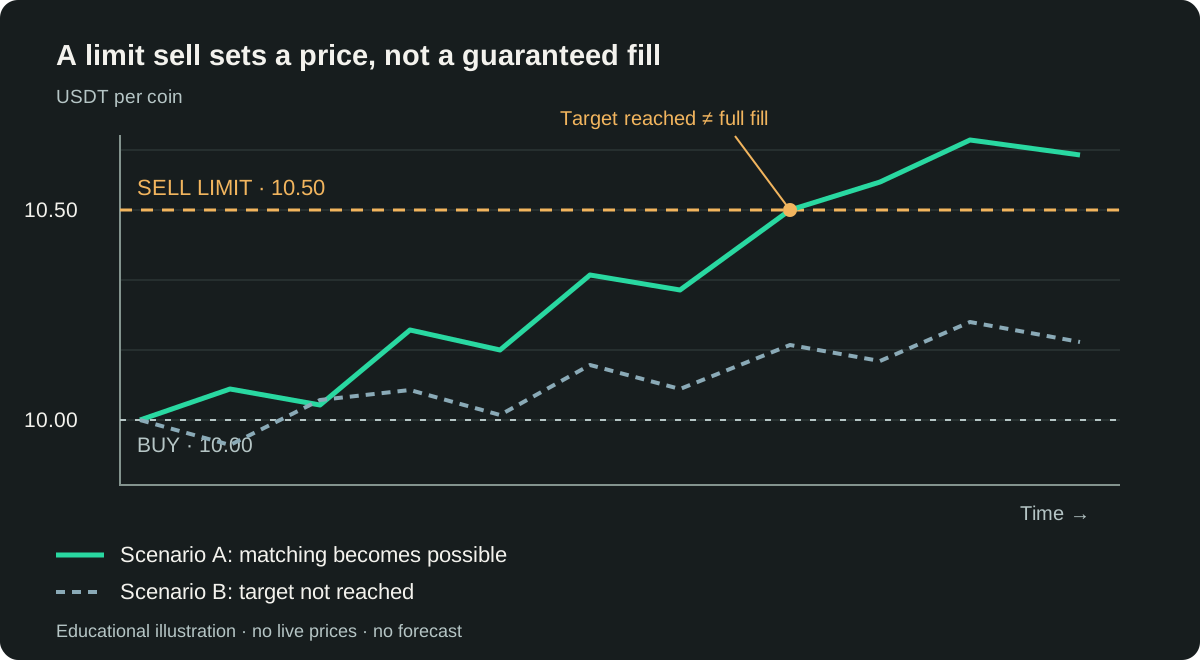
Bybit reserves the quantity committed to an accepted regular limit sell. If buyers take only 4 coins at 10.50, the gross proceeds so far are 42 USDT; the remaining 6 can stay open under GTC. Only executed quantity has been sold.
You can request cancellation of the remainder in Open Orders. Cancellation cannot undo fills, and execution may race with the request: check the confirmed final status. Released unsold quantity becomes available again; it is not additional sale revenue.
How to place a limit sell on Bybit Spot
The English web labels below follow Bybit’s current official Spot guide; mobile layout and translations can differ. This is an explanation, not a request to trade now.
- Open Bybit and use Trade → Spot, not a derivatives trading screen.
- Choose the intended pair, such as SOL/USDT. A SELL exchanges its base asset, SOL, for quote currency, USDT.
- In the order panel choose Sell, then Limit.
- Enter your minimum unit price and the quantity actually available to sell. Account for purchase fees deducted in coins.
- Review the order value, available balance, quantity step, price tick and minimum order value. Check any time-in-force option you select.
- Confirm the sale once. A rejected request does not become an open order merely because you clicked the button.
- Find the accepted request under Open Orders, in the relevant limit/market category. A non-marketable limit may wait there.
- Use Order History and Trade History to distinguish the final order status from individual fills, fees and actual average price.
Do not repeatedly submit because a screen refresh is slow. First establish whether the original order exists. Avoid placing a second sell for coins already reserved by an open one.
Limit, conditional, take profit and stop loss
A regular limit sell can rest in the book immediately. A conditional sell waits until its trigger is met, then activates the selected order type. The trigger is not the execution price. A triggered market order uses available liquidity; a triggered limit order still needs matching bids at its limit or better.
For example, a sell triggered at 10.50 with a limit of 10.45 has two separate values. After triggering it may sell as low as 10.45. If eligible bids disappear, it can remain unfilled. Choosing a market execution removes that limit instruction, not slippage or exchange protections.
Spot take profit and stop loss describe exit conditions: TP targets a favourable move; SL responds to an adverse one. Bybit’s Spot TP/SL trigger uses the Last Traded Price. Do not import futures Mark Price or position-close assumptions into a Spot tutorial.
Bybit’s Spot TP/SL reserves assets before the trigger. Its ordinary Conditional order does not reserve them until triggering, so a later lack of available coins can prevent placement. Inspect the selected product, not just a similar-looking price field.
A stop-market exit can execute away from the trigger during a fast fall. A stop-limit exit can trigger yet fail to sell while price moves below its limit. Neither provides a guaranteed loss ceiling. These are Bybit tools; this article does not claim that TradeMatic implements native Spot TP/SL.
Calculate the target price and the result after fees
The simple price-growth formula is TargetPrice = BuyPrice × (1 + TargetPercent / 100). At 10 USDT and 0.5%, it gives 10.05. This is a price target before fees, not a net-return formula or the exact TradeMatic pricing implementation.
A fee model with explicit currencies
Assume a 100 USDT purchase at 10 USDT per coin. For this example only, the purchase fee is 0.1% deducted in the acquired coin, and the sale fee is 0.1% deducted in USDT. Rates are hypothetical; check your own account, pair and applicable Bybit conditions. There is no separate additional 0.10 USDT debit in this purchase model.
| Item | Calculation | Result |
|---|---|---|
| Purchase debit | Quote actually spent | 100 USDT |
| Gross acquired | 100 ÷ 10 | 10 coins |
| Purchase fee, base asset | 10 × 0.001 | 0.01 coin |
| Net acquired / sold | 10 − 0.01 | 9.99 coins |
| Target sale price | 10 × 1.005 | 10.05 USDT / coin |
| Gross sale proceeds | 9.99 × 10.05 | 100.3995 USDT |
| Sale fee, quote asset | 100.3995 × 0.001 | 0.1003995 USDT |
| Net sale proceeds | 100.3995 − 0.1003995 | 100.2991005 USDT |
| Result for the fully sold lot | 100.2991005 − 100 | +0.2991005 USDT |
The price rose 0.5%; the lot returned approximately 0.2991% after these two fees. With these assumptions, break-even is 100 ÷ (9.99 × 0.999) ≈ 10.02003004. A desired net amount N would instead require (100 + N) ÷ (9.99 × 0.999), before exchange rounding.
If fees are charged in a different asset, change the model instead of counting the same fee twice. Use actual fills, fee currencies and sold quantity for realised results. A partial sale leaves unsold cost; a rounded-down quantity can leave dust. An illustrative target cannot replace execution records.
Why your limit sell may not fill
- No matching price: bids may remain below the limit even when the last-trade chart looks close.
- Too little liquidity: available buyers can absorb only part of your quantity.
- Queue priority: earlier eligible orders may consume the traded quantity first.
- A partial fill: check executed and remaining amounts separately rather than treating the whole order as completed.
- Size or precision rejection: the exchange’s current minimum value, quantity step or price tick may invalidate placement. This is not an accepted order waiting for a fill.
- A placement error: insufficient available coins, permissions or a connection failure require status verification, not blind resubmission.
- Cancellation: user action, Post-Only or a different time-in-force can remove the remainder.
- Exchange protection: price limits and execution safeguards can restrict acceptance or execution.
- A chart touch: one last trade or candle high does not prove there were enough bids to execute your entire sale.
Start with the order ID, status, fill quantity and rejection reason. Lowering the price or changing to Market is a new trading decision, not a technical obligation to make an order disappear.
How TradeMatic automates a linked sale
TradeMatic connects your own Bybit Global Spot account to Telegram. You set the pair, purchase amount in USDT, drop percentage, target growth and purchase delay. Its execution path sends a market BUY with a quote budget, records actual executed quantity and average price, and prepares a linked GTC limit SELL for its acquired lot.
- BUYConfirm actual fills and owned quantity
- TargetGrowth, fee adjustment and exchange precision
- LIMIT SELLSubmit and track the linked order
- FilledRecord fills and fees; reconcile the actual result
- Next actionOnly if the active continuation and entry guards allow it
The configured percentage is not a guaranteed net profit. Current planning uses the executed buy price with target-growth and fee-rate adjustments, then applies Bybit quantity, price and minimum-value rules. Accepted order parameters and execution facts matter more than an unrounded estimate. Net acquired coins can be lower than gross fills when a fee is charged in the base asset.
Partial fills update sold quantity and accounting; only full completion of the latest confirmed bot-created SELL of the active pair can authorise one continuation. This includes a sell created after a drop buy. An older sell is accounted for but does not independently start another buy.
Additional buys use a percentage decline from the last actual BUY of that pair, without requiring a rebound first. They still require funds, current user intent and execution safeguards. STOP prevents new entries; it is not a blanket exchange cancellation. A BUY already sent before STOP can still complete and receive its linked SELL. Already placed sells remain on Bybit and their executions are still tracked. Changing the active pair does not make old sells start purchases of the former pair.
The bot does not turn unrelated pre-existing Bybit coins into its own acquired lots. Its linked cycle is different from instructing a tool to sell an arbitrary free balance. Review the algorithm and controls, API-key guide and bot comparison before enabling automation. Subscription cost is separate from exchange fees.
Which tool fits the sale?
| Tool | What it handles | What still needs attention |
|---|---|---|
| Manual Bybit limit sell | One standing price instruction | Quantity, fees, waiting and cancellation |
| Bybit conditional order | A trigger before market/limit activation | Funds, execution price and trigger outcome |
| TradeMatic | Repeated own-lot buys, linked sells and permitted continuations | User settings, capital, access and strategy risk |
A single target sale does not require a bot subscription. Repeated automation adds operational responsibilities as well as convenience; check current service terms before paying.
Risks remain after you automate
Liquidity, volatility, fees and slippage can make a planned outcome unavailable. Open sells reserve coins, and a falling market can leave them waiting while their value declines. Unrealised losses remain economic losses even if completed trades look profitable.
API outages, lost responses, stale data and incorrect settings add operational risk. Repeated buys can accumulate exposure; a target price does not cap that exposure or provide a stop loss. Monitor balances, open orders and actual fills. This is educational material, not an investment recommendation. Read the risk disclosure; no sale or profitable cycle is guaranteed.
Frequently asked questions
Can I automatically sell crypto when it reaches a target?
Yes: a Spot limit sell can wait at your minimum price. Conditional tools add a trigger, but reaching either price does not guarantee a complete fill.
Does Bybit support limit sell orders?
Yes. Select the Spot pair, Sell and Limit; check available quantity and current order rules before submitting.
Is a limit sell guaranteed to execute?
No. It requires matching demand and can remain open or partially filled.
How does a market sell differ?
It attempts immediate execution against available bids rather than setting your minimum price. Slippage and exchange safeguards can affect the outcome.
Do fees reduce the result?
Yes. Purchase and sale fees, their currencies, rounding and actual quantities all matter. A 0.5% price increase is not automatically a 0.5% net return.
What happens after a partial fill?
The filled quantity is sold. A GTC remainder can stay open; calculate realised results on the sold portion and retain the remaining cost separately.
Can I cancel an open limit sell?
You can request cancellation of the unfilled remainder. Confirm the final exchange status, since fills can occur before cancellation completes.
Is take profit the same as a regular limit sell?
No. Spot TP/SL uses a trigger; execution then depends on its selected market or limit instruction. A regular limit can already be in the book.
Can a Telegram bot place sales automatically?
A connected service such as TradeMatic can place linked sells under its configured strategy and permissions. It does not remove exchange execution risks.
Does TradeMatic guarantee a profitable sale?
No. Target growth, fee estimates and automation cannot guarantee market liquidity, a completed sale or a profitable portfolio.
Official sources and scope
Official Bybit documentation checked on 13 November 2026. The order examples are hypothetical, not live trades. TradeMatic behaviour was checked against current source code without accessing accounts or placing orders.
- Order types
- Spot interface and order management
- Spot TP/SL, trigger and reservation
- Spot TP/SL introduction
- Fee currencies and examples
- Account-dependent fee schedule
- Post-Only
- GTC, IOC and FOK
- Spot trading and execution protections
- API order parameters and asynchronous acceptance
- Current pair rules and precision fields
- Cancellation acknowledgement