Can you control a Bybit trading bot through Telegram?
Yes: Telegram provides an interface for a trading application connected to Bybit’s API. In TradeMatic, you configure a supported Spot pair and budget, connect your own account and request automation. TradeMatic checks conditions; Bybit accepts and executes orders. Telegram is not the exchange or trading engine.
Command receipt, order acceptance and execution are separate events. A chat reply does not guarantee an immediate purchase; a delayed notification does not prove a failed trade.
How Telegram trading bots work
The Bot API delivers messages and button presses to an application and carries its responses. Authorization, settings and strategy belong to that application, not the visible command menu.
Telegram supports polling or webhooks. These are alternative update transports, not trading algorithms. The inspected TradeMatic user path uses polling, identifies the private Telegram user, validates access and routes commands. Saved instructions reach the worker, which separately checks the account, pair and proposed operation.
Telegram → TradeMatic → Bybit: commands and results
The forward path carries instructions; the return path carries exchange evidence and, separately, user messages. TradeMatic’s checked implementation includes handlers, saved settings, trading controls, Bybit REST and public/private streams, execution tracking, accounting and a notification queue.
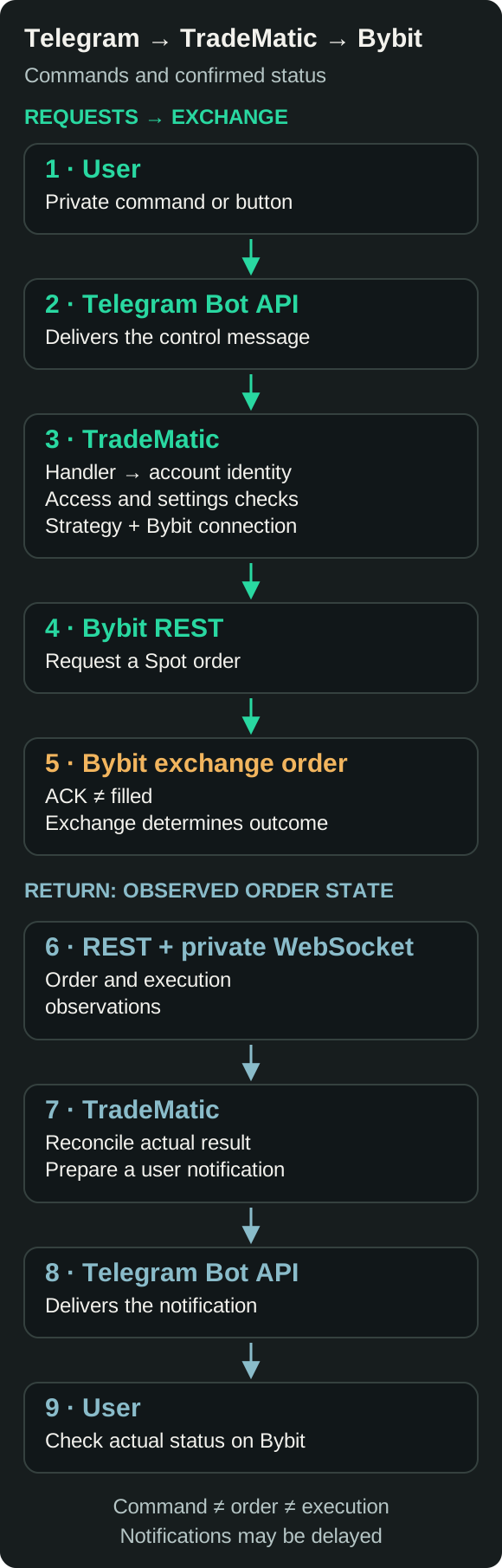
Bybit is authoritative for exchange orders and executions. A REST acknowledgment is not a fill report. Observations must match the intended operation; Telegram accepting a message does not prove its recipient read it.
Why a Bybit API key is needed
An API Key identifies authorized exchange access; the API Secret of a system-generated HMAC key signs requests. Neither is your exchange password or Telegram verification code. Bybit supports other authentication types, but TradeMatic’s current wizard expects the supported HMAC route.
Reading funds and placing orders are different permissions. Trading requires suitable Read/Write and SpotTrade access on Bybit Global mainnet with supported UTA 2.0 account mode. Read-only connectivity does not authorize trading.
Create limited API access, not unlimited authority
Follow the current API setup guide. Use required Spot permissions, without unnecessary withdrawal or transfer authority. Withdrawal permission is not needed; trading authority itself still permits unwanted trades and losses.
Use compatible IP restrictions and obtain any required address only through official setup instructions. Protect the exchange account, inspect activity and revoke compromised keys. Revocation removes future access, not existing fills or standing orders. No key policy guarantees safety.
Connect Bybit through the actual TradeMatic settings
- Open the official @TradeMaticBot. For a new user,
/startopens language selection and onboarding. Review the terms, privacy notice and risks and use the existing acceptance button. - Arrange the required subscription through the bot’s existing payment flow. A new user need not start trading to configure payment or settings.
- Open
/settings. For an existing connection, the menu includes “Update Bybit keys”, “Bybit connection status”, “Trading pair” and “Trading parameters”. Initial setup also requests an available pair. - Follow the prompts for the supported Bybit API Key, then API Secret, in the private bot chat. Do not send credentials in a group or to an imitation account.
- Review connection status, account mode, permissions, reading checks and the selected parameters before requesting trading.
Checks include key identity and permissions, account compatibility, instrument rules, wallet and fees. Some observations can remain incomplete: distinguish a saved connection from trading readiness. Replacing keys does not stop an existing RUN. Use /stop first if you want new entries to stay stopped. Ordinary bot chats are not end-to-end encrypted Secret Chats; these credential inputs pass through Telegram and TradeMatic. Do not assume message deletion removes every copy.
Set the pair, budget, thresholds and delay
Numeric settings use a two-message exchange: send the command, then the requested number. For example, send /summ, wait for the prompt, then send 100. Do not treat /summ 100 as the supported setter format. Plain decimal numbers accept a dot or comma; omit currency and percent suffixes.
| Command | Purpose | Example next input | Bounds and effect |
|---|---|---|---|
/pair | Active pair; choose an available button. | SOL/USDT, when available | Can change during RUN; old SELLs retain their pair. |
/summ | Full budget for one future BUY. | 100 | 10–1,000,000 USDT; funds and exchange rules still apply. |
/growththreshold | Growth parameter for subsequent SELL planning. | 0.5 | 0.1–99%; does not reprice standing SELLs. |
/dropthreshold | Drop from the latest confirmed BUY of this pair. | 5 | 0.1–99%; not stop-loss or scheduled DCA. |
/timerseconds | Delay before an eligible purchase. | 15 | 1–60 seconds; decimals allowed, not a recurring schedule. |
Changes are saved and applied through the current controls. During RUN they can cause a controlled session refresh; an in-flight or unresolved operation can defer a pair transition. During STOP, changing a parameter does not independently start trading. These are purchase-on-drop and linked-sale settings, not a fixed Grid range or scheduled DCA plan. See the dip-buying guide.
Verified TradeMatic Telegram commands
This table describes current ordinary-user handlers, checked on 18 November 2026. Subscription, consent, connection readiness and current operation state can restrict a command’s result. A listed command is not a promise that it will place an order.
| Command | Purpose | Limits |
|---|---|---|
/start | Onboarding or request automation. | Existing eligible user can request RUN; not fill proof. |
/stop | Stop new entries. | Existing owned obligations remain supervised. |
/settings | Connection and setting menus. | Requires consent/subscription; opening does not start trading. |
/pair | Choose an available pair. | Use buttons, not an inline symbol. |
/summ | Set purchase budget. | Send number in the following message. |
/growththreshold | Set growth parameter. | Separate numeric reply; not a profit report. |
/dropthreshold | Set drop threshold. | Separate numeric reply; last actual BUY baseline. |
/timerseconds | Set purchase delay. | Separate numeric reply, in seconds. |
/autobuy | Request an auto-buy check. | RUN required; no forced extra BUY. |
/balance | Available / locked by coin. | A read observation, not always-live funds. |
/orders | Bybit open orders of selected pair. | May include manual orders; not full history. |
/ordersw | Own tracked SELL obligations. | Selected account; can include older pairs and pending states. |
/price | Selected pair last price. | Fresh ticker required; not fill price. |
/stats [MM.YYYY] | Own recorded selected-pair report. | Optional /stats 11.2026; month uses Moscow dates; queued delivery. |
/help · /about · /faq | Help and product information. | Informational, not trading execution. |
/language | Choose RU or EN. | Use the language buttons. |
/pay · /subscribe | Subscription options. | Own billing flow; consent needed for invoice creation. |
/invoice | Read latest own invoice. | Not an exchange order or payment confirmation by itself. |
/cancel | Leave current input/setup. | Does not cancel exchange orders. |
Use /help for the current menu and /cancel to leave an input sequence. Administrative and debugging controls are intentionally excluded. The illustrations below use invented values and shortened current message templates; they are not screenshots or records from a real account.
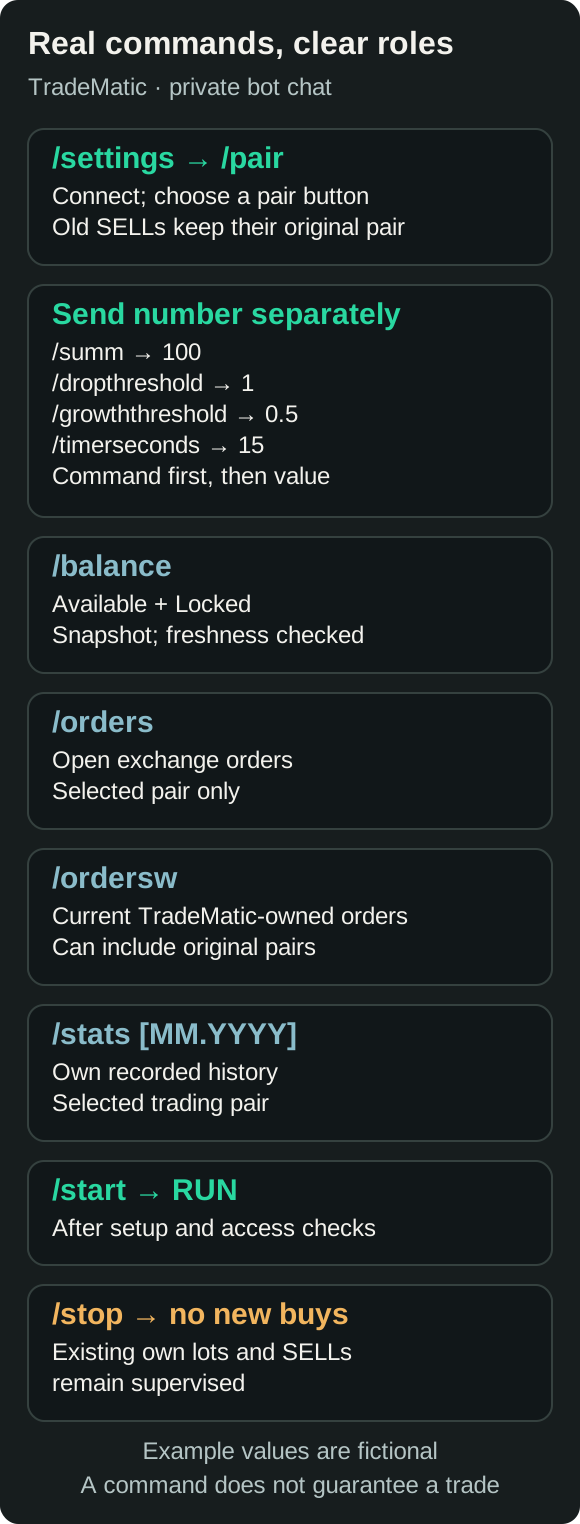
Request automation without confusing it with onboarding
For an eligible existing user, /start requests RUNNING, not merely registration. Review account, settings and budget first.
The worker checks access, streams, pair, funds, rules, delay and unresolved operations. An initial MARKET BUY requires admission. While RUNNING, /autobuy requests an existing auto-buy check; it does not force an extra order. Repeated commands are not independent purchases.
An accepted open SELL alone does not require every drop-buy to wait for its fill. Other financial or operational guards can still block an entry.
What stopping TradeMatic actually does
Once accepted, /stop saves STOPPED and prevents new entries. Pending new continuation is canceled by the control path. Existing bot-owned lots and standing SELL obligations remain supervised; stopping is not a cancel-all, immediate liquidation, withdrawal or API-key revocation command.
A BUY already submitted before STOP can still be accepted or filled. The application must determine its outcome and can arrange the corresponding exit. Do not assume that a stop reply reverses an exchange request already in flight. Bybit orders do not disappear because Telegram or the application goes offline.
A later start rechecks current operations, without guaranteeing an immediate BUY. A SELL filled during STOP does not imply a retrospective rebuy. If you intend to cancel an exchange order, inspect it on Bybit and use the exchange’s controls deliberately. Cancellation can race with execution and is different from simply stopping new entries.
Read available and locked balances
/balance shows “Available” and “Locked” by coin. USDT reserved in an order is not free purchasing power; base coins committed to a SELL cannot be sold again. Wallet assets can include coins TradeMatic never bought.
This is a read observation, not an always-live ticker. Cached data, availability and refresh delays affect its age. Total holdings are not the next purchase’s available budget or proof of bot-owned inventory.
Open orders, tracked orders and executions
/orders reads open Spot orders on Bybit for the selected pair. It can show a partially filled order and its remaining quantity; the list is not limited to orders created by TradeMatic. /ordersw shows the application’s own tracked records and outstanding owned SELL obligations, including earlier pairs for the selected account. Its purpose is different from exchange-wide history.
An open-order response, saved application record, order-history item and execution fill are different evidence. A canceled order may already have partial executions; an order can have several fills. The interface does not expose every Bybit status as a separate command or message. /stats summarizes the bot’s recorded history, not your entire wallet’s investment return.
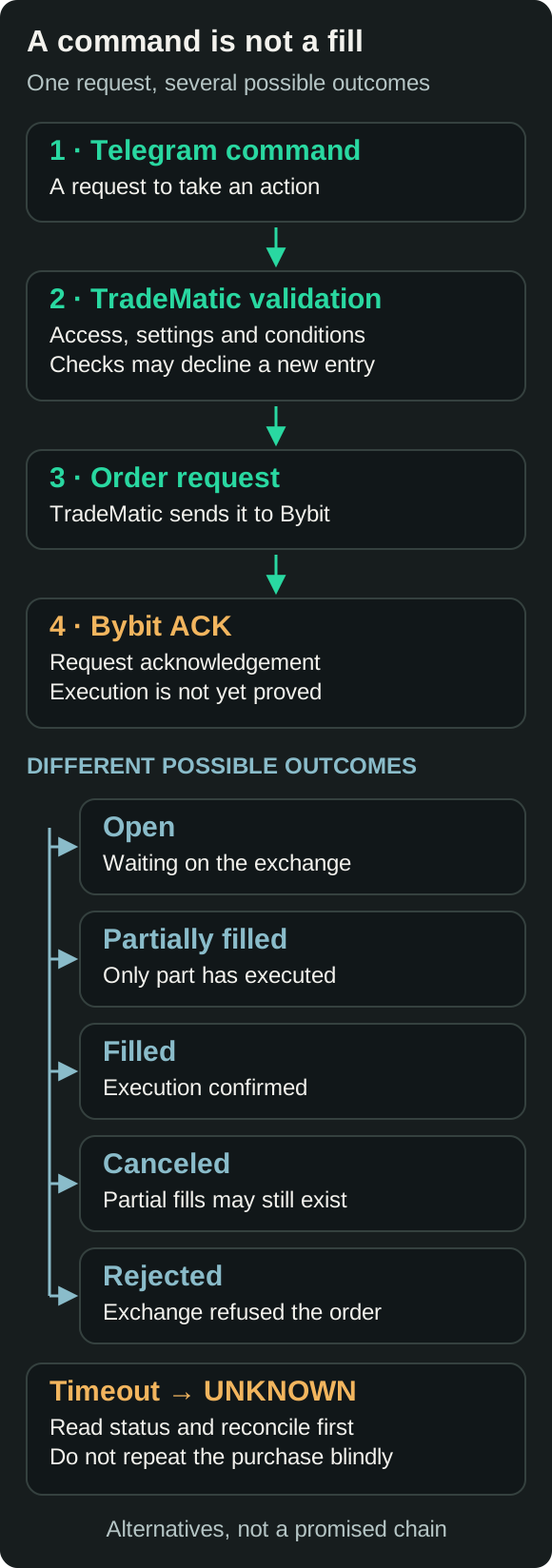
Which trading notifications are actually produced?
The checked Bybit path produces DROP when a new drop intent is saved, BUY after confirmed purchase execution, and SELL after accepted sale parameters are confirmed. Missing parameters can produce a provisional message. DROP is not proof that BUY was submitted.
A FILLED card reports sale-fill evidence. Realized profit additionally needs linked purchase cost, disposed quantity and commissions. Incomplete evidence can leave profit pending; estimates are not confirmed accounting.
The warning about waiting for an earlier account operation requires at least five minutes of a still-current eligible blocked entry and a final delivery check. This threshold does not delay BUY. The existing report worker also prepares personal and group daily reports, separately from fills.
Key-validation responses and funds-related status exist, but the inspected native Bybit path does not establish proactive alerts for every such failure. The queued sender can be delayed, fail or have an unknown outcome. A missing card does not establish a missing trade; guaranteed resending is not promised.
A complete illustrative trading cycle
ABC/USDT below is a fictional teaching pair, not a promise that it appears in TradeMatic’s selector. Assume a 100 USDT budget, an actual average BUY of 10 USDT, a 0.5% growth setting and a 5% drop threshold. The actual MARKET fill need not equal a previously displayed quote.
- The user configures a supported pair and grants trading permission.
- The worker validates current conditions and, when permitted, submits the budget-based MARKET BUY.
- Confirmed fills establish purchased quantity, average price and known fees.
- Assuming BUY and expected SELL fee rates of 0.1% each, the checked planning rule gives
10 × (1 + 0.005 + 0.001 + 0.001) = 10.07. Valid instrument increments and quantity rules still apply. - A linked LIMIT SELL is accepted and monitored. Acceptance alone does not establish a sale.
- Executions update quantities and accounting; a notification is a later, separate delivery step.
If BUY fee is 0.01 ABC, net coins are 9.99. Selling all at 10.07 with a 0.1% quote fee yields 100.4987007 USDT, or +0.4987007 USDT against the 100 cost. Thus the 0.5% setting is not a guarantee of exactly 0.5% net return. Use the fee calculator for explicitly stated assumptions.
The drop threshold from the last actual BUY of 10 is 9.50. A new admitted drop-buy can receive its own SELL; no prior rebound is required. Only the latest eligible bot-owned SELL of the active pair can create one continuation after full execution. An older SELL filling does not independently authorize another BUY.
Change a pair without assuming old orders disappear
/pair opens the current pair and available pair buttons; it is not a same-line symbol setter. The supported candidate list is checked against current Bybit availability. A preliminary STOP is not required merely to change the pair. During RUN, the application applies the new context through its controlled transition; unresolved or in-flight work can defer completion.
Existing SELL orders of the former pair remain on Bybit and continue to be tracked. Their fills update their own quantities and results; they do not initiate fresh purchases of an inactive pair. The new pair has its own confirmed BUY baseline and continuation eligibility. Changing a symbol is not a transfer, conversion or cancellation of old assets.
Protect Telegram as part of trading access
Enable Telegram two-step verification, protect devices and review active sessions. Check the official bot’s exact address before entering credentials. A similar name or logo is not identity proof. Never share Telegram login codes, account passwords or recovery information with a bot or someone claiming to provide support.
Ordinary bot conversations are not Secret Chats. Your interaction is processed by Telegram and the bot operator; it must not be described as end-to-end encrypted. This guide does not promise a particular secret-storage encryption mechanism or guaranteed deletion. Restrict API permissions and revoke compromised access promptly, while separately checking outstanding orders and account activity on Bybit.
Telegram, TradeMatic and Bybit have different jobs
| Responsibility | Telegram | TradeMatic | Bybit |
|---|---|---|---|
| Command input | Chat and buttons | Validate and handle | No Telegram command |
| Settings and strategy | Interface only | Applies saved rules | Enforces exchange rules |
| Assets | No custody | Tracks owned lots | Holds exchange assets |
| Order placement | Carries instruction | Submits API request | Accepts/rejects request |
| Execution | No matching | Observes and reconciles | Matches orders |
| Fill history | Messages are not a ledger | Linked records/accounting | Exchange executions |
| Notifications | Transports message | Builds and queues | Sends API/stream status |
| Errors | Messaging failures | Controls and reconciliation | API/trading errors |
| Fees | Not this Spot fee | Estimates/accounts | Charges applicable fee |
Telegram does not hold the coins for this setup, and TradeMatic is not a separate exchange. Bybit stores the exchange assets and execution records. TradeMatic stores its own settings and operation/accounting records; those records must be reconciled with exchange evidence rather than treated as a second exchange truth.
What if Telegram, TradeMatic or Bybit is unavailable?
Telegram failure can delay commands and messages while trading services continue. An application outage can pause actions and monitoring, while accepted Bybit orders still execute. Neither guarantees cancellation or a safe exit.
A lost order response can leave an unknown outcome. The inspected implementation saves operation identity and reconciles observations rather than assuming rejection. Heartbeats, reconnection and order/execution checks support recovery, not guaranteed success.
Rate limits defer reads; partial executions leave quantities and cost to reconcile. Invalid keys or rights can block access. Insufficient available funds differ from a larger total balance or an unmet price threshold.
Check current status and exchange records before repeating instructions. Retry and deduplication controls do not promise exactly-once behavior across every network failure. Investigate message delivery and trading outcomes separately.
Convenience and limits of Telegram control
Mobile settings, compact order views, remote start/stop requests and messages avoid keeping a browser open. The strategy runs in the application, not on an open Telegram screen.
Dependencies remain: Telegram, TradeMatic, Bybit, API authority and connectivity. Data can be stale, messages delayed and actions guarded. Telegram control is not unique to one product; compare workflows, strategies and access risks in the Spot bot comparison.
Who is this workflow for?
TradeMatic may suit users applying their own Spot parameters, managing them in Telegram, monitoring linked orders and using price-drop purchases. It requires understanding budgets, fees, inventory and API risks.
For one ordinary limit sale, Bybit’s own interface may suffice; a subscription is not inherently needed. The target-sale guide and Grid versus DCA comparison distinguish single orders, native bots and TradeMatic’s actual rules.
Use commands as controls, not execution receipts
Telegram carries instructions, TradeMatic evaluates automation, and Bybit accepts and executes orders. Check evidence at each stage. Limit credentials, distinguish available and reserved funds, and understand STOP and pair changes. Automation removes neither financial nor technical risk.
Frequently asked questions
Can I control a Bybit trading bot through Telegram?
Yes. An application exposes supported settings and commands and uses your authorized Bybit connection; its trading guards still apply.
Does Telegram execute crypto trades directly?
No. Telegram delivers interface events. TradeMatic decides whether an exchange request is permitted, and Bybit handles order acceptance and matching.
Do I need a Bybit API key?
Yes: the supported Bybit Global HMAC connection, account mode and Read/Write SpotTrade rights. Read-only access cannot authorize trading.
Can a Telegram trading bot withdraw my funds?
That depends on granted API rights. Withdrawal authority is unnecessary here. Limiting it does not remove trading or account-compromise risks.
How do I change my trading pair?
Use /pair or “Trading pair” in /settings and choose an available pair. Existing old-pair SELLs remain; a pending operation can defer the transition.
Can I check my Bybit balance through Telegram?
/balance shows available and locked coin balances. Treat it as a dated read observation, not a guarantee of immediately spendable funds.
Will I receive notifications when an order is filled?
Sale-fill notifications are produced, but delivery can be delayed or uncertain. FILLED and complete realized-profit accounting are separate states.
What happens if Telegram or the trading bot goes offline?
Commands, monitoring or notifications may pause depending on the failed component. Already accepted Bybit orders can still execute; no universal automatic recovery or cancellation is promised.
Does stopping TradeMatic cancel all open orders?
No. /stop prevents new entries while existing owned obligations remain supervised. A previously submitted BUY may still require reconciliation and an exit.
Is Telegram trading automation safe?
Account, API, software and market risks remain. Protect sessions, restrict permissions and inspect exchange activity; safety and profit are not guaranteed.
Official sources and scope
Official Telegram and Bybit sources checked on 18 November 2026. Product claims were checked against current source code. Examples are invented, not account records or live tests.
- Telegram Bot API
- Bot features
- Bot FAQ
- Telegram privacy
- Telegram FAQ and security
- Bybit API introduction
- API integration
- Order creation and acknowledgment
- Open-order observations
- Order history
- Execution history
- WebSocket connections
- Private order stream
- Private execution stream
- API-key background
- Actual API permissions
- Current key-creation guidance